
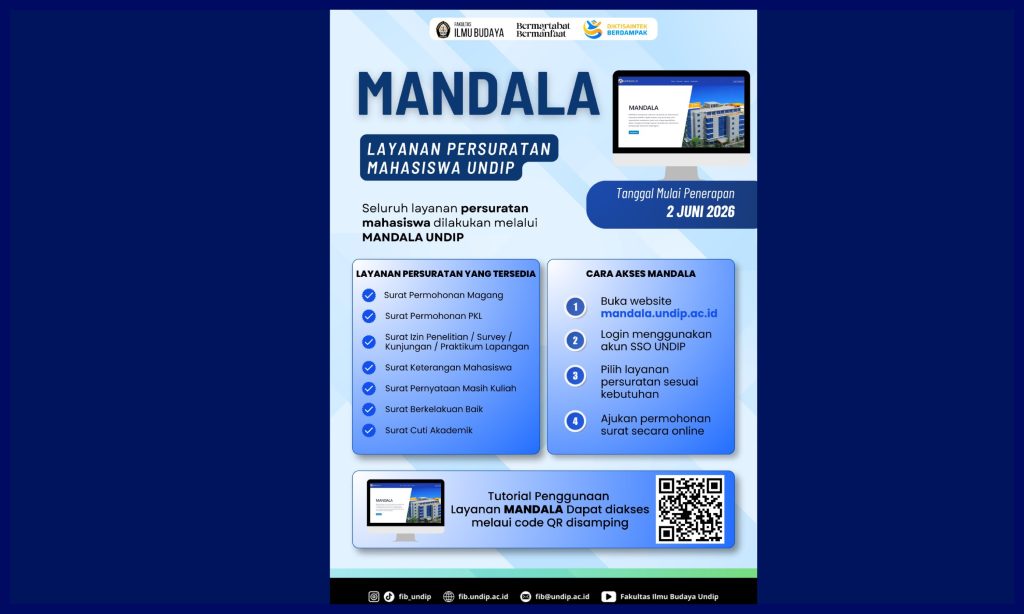
FIB UNDIP – Good news for all of us who often feel dizzy taking care of a pile of academic files! Diponegoro University has just presented the latest digital innovation that is ready to make our administrative affairs much more practical and efficient. This integrated platform is named MANDALA, short for Academic and Administrative Document Management.
The presence of MANDALA becomes a real step of the campus in doing digital transformation in order to cut complicated bureaucracy, so that all services can be accessed in just a few clicks.
One Door for the Whole Academic Civitas
As an integrated digital platform, MANDALA is specially designed to simplify the work and study ecosystem in the Undip environment. This system integrates document management services for the three main pillars of the campus, namely students, lecturers, and educational personnel (tendik).
In addition to making affairs fast-paced aka sat-set, the migration to this platform also brings a big mission to reduce the use of paper (paperless) in the Faculty of Cultural Studies. All document tracking processes can now be monitored in real-time, so we no longer need to guess where our file progresses.
Easy Guide: How to Use MANDALA Service
So that you don’t get confused when you first try it, let’s follow the following short and practical tutorial on how to use the MANDALA platform:
Step 1: Log In (Log In)
First, open the official page of MANDALA mandala.undip.ac.id. You can immediately log in using the Single Sign-On (SSO) Undip account that you usually use every day. Practical, no need to create a new account anymore!
Step 2: Choose the Service Needed
After successfully entering the main page, you will be presented with various administrative service menu options. Find and click the type of service or specific document that you want to apply or take care of.
Step 3: Fill in the Electronic Form
The system will display a digital form. Fill in your personal data and the requested information carefully, correctly, and make sure there are no mandatory columns that are missed so that the verification process runs smoothly.
Note:
– After all the data is filled, you just need to send the application and monitor the status directly through the system.
– The letter does not need to be taken at the faculty academic counter but downloaded and monitored on the MANDALA Undip page https://mandala.undip.ac.id
It’s easy, isn’t it? Come on, start taking advantage of this MANDALA platform to support the smoothness of your daily academic activities, Dips!